![Logo-Jan-08-2025-02-49-57-3639-PM.png]](https://knowledge.bridge.audio/hs-fs/hubfs/Logo-Jan-08-2025-02-49-57-3639-PM.png?height=15&name=Logo-Jan-08-2025-02-49-57-3639-PM.png)
One of the coolest thing with Bridge.audio is that you are always in control of the links you share, before AND after sending them. Those “dynamic” links also provide full activity report so that you are always aware of who is doing what with your files!
Sharing Links tab
Once you have shared a link with your recipients, whether manually or by email, you retain full control over it. You can modify the associated content at any time, as well as manage its sharing settings.
For each project or asset you have shared, you can access the list of your links by clicking the “Share” button on the relevant item.
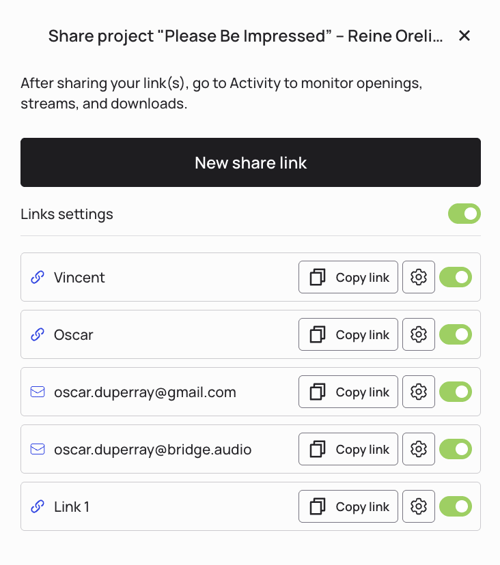
From this list, several actions are available:
- Copy the link to share it again with someone;
- Disable a specific link or all links by clicking the green check mark if you no longer want them to be accessible;
- Access the settings by clicking the dedicated icon.
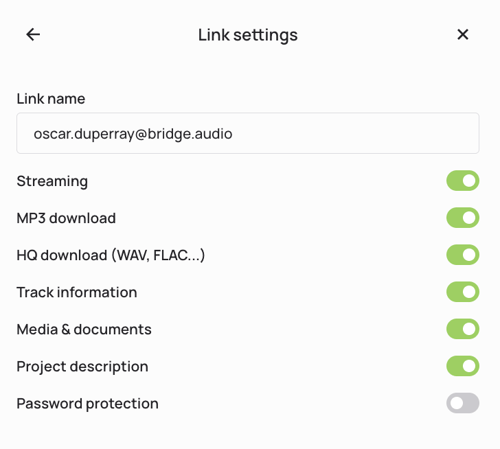
In the settings, you can adjust link permissions at any time. This allows you to maintain full control over access rights and to enable or revoke specific permissions whenever needed.
Dynamic Links
As mentioned above, Bridge.audio provides fully editable links, that can be updated at will, even after sharing them. No need to generate new links every time you need to update something or if you made a mistake!
Everything you can do:
-
Update the content of your links whenever you want
-
Add, change, or remove tracks in a project, an album, or an artist discography
-
Add, change, or remove media and documents in a project
-
Add, change, or remove a cover picture in a project
-
Add, change, or remove the text description in a project
-
-
Update the very tracks you have already shared through your links
-
Add, change, or remove metadata, tags, right holders, etc
-
Replace the audio file of the track (for example to change format, or to upload the latest version of the track)
-
-
Change the sharing authorizations for any link
-
Activate/Deactivate download, access to media, to the description, etc
-
Add, change, or remove the password for any link
-
-
Turn on and off any link, anytime you want, as many times as you want
-
With Free and Pro plans, links never expire. You decide when to turn them off, if ever.
-
❓Will my links expire at some point?
Whether you’re on a Free or a Pro plan, there is no expiration date for the links you share. You decide to turn them on and off at your will. That means your link can live for 10 minutes, or 10 years, it’s all up to you.