![Logo-Jan-08-2025-02-49-57-3639-PM.png]](https://knowledge.bridge.audio/hs-fs/hubfs/Logo-Jan-08-2025-02-49-57-3639-PM.png?height=15&name=Logo-Jan-08-2025-02-49-57-3639-PM.png)
This sharing option allows you to quickly send content to multiple email addresses at once.
You can, for example, copy and paste an entire mailing list from a spreadsheet directly into the recipient field in Bridge.audio. This is especially convenient for newsletter-style emails or bulk communications.
With this sharing feature, Bridge.audio takes care of sending the email for you.
💡 If you often share your tracks with the same people, there’s no need to retype their email addresses every time: auto-complete is enabled.
You can also select the email address you want to send your message from.
💡 Before sending, make sure you've confirmed the email address of your Bridge.audio account.
To add a recipient, type their email address, then press Enter on your keyboard or click the Enter icon next to the address. The address is validated once it appears as a tag.
Here is how a valid address mail is written : 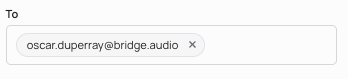
Recipients can send you feedback by replying directly to the email they receive.
Each recipient receives a unique link, allowing you to track activity such as opens, streams, and downloads.
You can set custom permissions for each recipient and enable or disable any link at any time, as many times as needed.
