![Logo-Jan-08-2025-02-49-57-3639-PM.png]](https://knowledge.bridge.audio/hs-fs/hubfs/Logo-Jan-08-2025-02-49-57-3639-PM.png?height=15&name=Logo-Jan-08-2025-02-49-57-3639-PM.png)
Downloading Your Track(s)
It is entirely possible to download your files and tracks from Bridge to your computer. When doing so, all the ID3 metadata you previously added in your Bridge workspace will be preserved and accessible on your computer. This allows you to easily keep track of information such as track title, artist, album, etc.
⚠️ Please note: AI-generated tags and credits will not be included when downloading files from Bridge.
Here is how to do it :
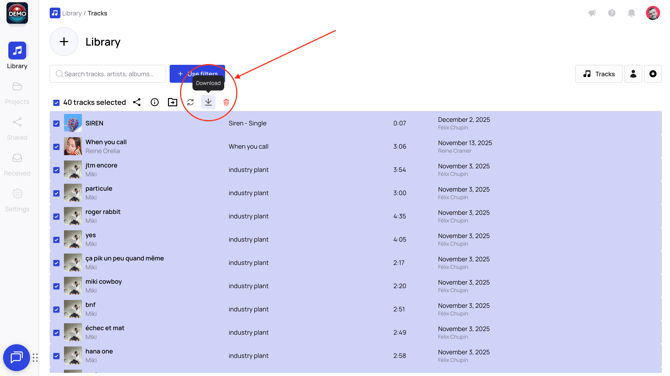
- Select one or multiple tracks from your library
- Click on the Download button
Exporting Your Library
If you want to export your entire library or a portion of it, you can request a CSV export by contacting our team at hi@.bridge.audio.
💡 Coming soon: The ability to export a CSV directly from your Bridge workspace will be available soon. In the meantime, you will need to contact the team to receive your export.