![Logo-Jan-08-2025-02-49-57-3639-PM.png]](https://knowledge.bridge.audio/hs-fs/hubfs/Logo-Jan-08-2025-02-49-57-3639-PM.png?height=15&name=Logo-Jan-08-2025-02-49-57-3639-PM.png)
At any moment on Bridge.audio, you can share one or several tracks in just a couple of clicks.
To do so, simply select the files you want to share in your library, either from your main tracklist, or from album or artist pages.
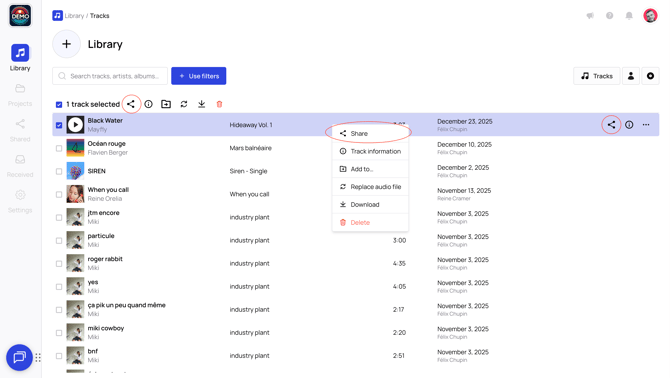
To share a single track
Pass your mouse over the track or perform a right click or use the checkbox to select the track and click on the Share icon .
Then you'll have to click on "New share link" and select the method you want to use, to send one or multiple sharing links.
To share a selection of tracks
Use the checkbox available next to each track to add it to your selection. Once your selection is ready, click on the Share icon in the action menu above the list of tracks. 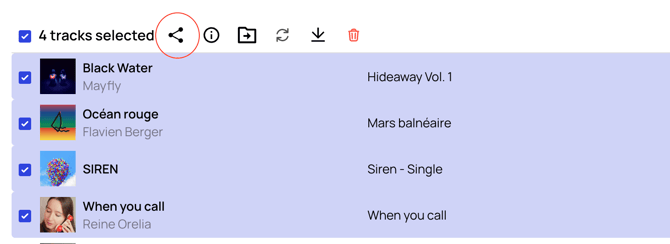
There is also a "Select all" option, you'll have to select the checkbox next to Track

About sharing methods:
🖇️ Send links manually
📧Send links via email
About sharing options:
🎛️ All sharing options
❓How to control the quality in which I share my tracks?
The latest version of Bridge.audio allows you to decide the format in which your project will be available to your recipients for download.
When you access the sharing window you can decide to only permit MP3 download, or you can allow Original quality download (meaning the original format in which you uploaded the tracks in your library). You can also decide to allow both types of download, it is all up to you! Simply select your preferred options.