![Logo-Jan-08-2025-02-49-57-3639-PM.png]](https://knowledge.bridge.audio/hs-fs/hubfs/Logo-Jan-08-2025-02-49-57-3639-PM.png?height=15&name=Logo-Jan-08-2025-02-49-57-3639-PM.png)
My account Vs My workspace
For an optimal experience on Bridge.audio, you must understand the difference between your account, and your workspace(s).
On one hand, your Bridge.audio account represents your unique persona connected with a unique email address.
On the other hand, a Bridge.audio workspace is the online location where one or several accounts meet to work, upload files, and share projects.

Thus with a single account you can work on several workspaces, meaning several libraries, with their own different projects.
📌 Examples of multiple workspace usage:
- When collaborating with multiple individuals on various projects, you have the option to establish a private workspace with each of your partners.
- Companies (such as labels) with 10+ employees will tend to create multiple workspaces to divide teams → for example Marketing & promotion, Production / A&R, Sync team…
- People wearing several hats in music can also take advantage of the multiple workspaces feature. For instance, John Doe will have three workspaces:
- One with the publishing company he works for (shared with his colleagues)
- One with the band he’s a part of (shared with band members + their manager)
- One solo workspace for his side activity as a DJ .
To switch from a workspace to another that you are part of, click on your current workspace name on the top left side of Bridge.audio. Then select the workspace you want to switch to, by clicking on its logo.
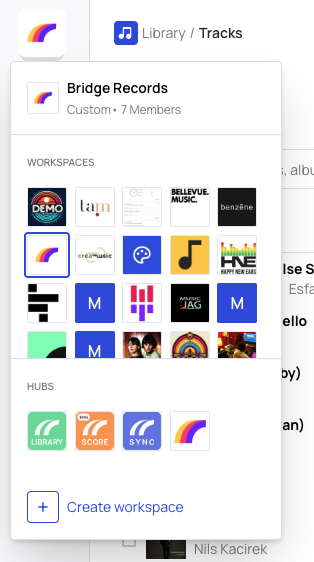
A workspace is defined by:
- its name
- its members
- its storage capacity
- its projects
Create a workspace on Bridge.audio :
There are two ways to create a workspace on Bridge.audio.
Option 1: You already have a workspace
If you already have a workspace, go to the top-left corner of Bridge.audio and click on your current workspace logo.
Then click on Create Workspace.
From there, the process is the same as if you were creating your first workspace.
Option 2: You don’t have any workspace yet
If you don’t have a workspace yet, you will be guided through the workspace creation flow as soon as you start.
Workspace setup steps
To create your workspace, you will need to:
-
Choose a name for your workspace
-
Upload a logo
-
Select your main activity
-
Invite your team by entering their email addresses
Once these steps are completed, your workspace is successfully created and ready to use.
You can create as many workspace as you need however if you have a paid plan on another workspace your new workspace will be on a free plan.